Question
I got my network going but now i need to get the internet on my other computer, how would i set up everything?
Answer
You can accomplish this in a number of ways:
Method 1 has the advantage of ease of configuration. The software practically does all the work for you. The configuration is fast and there is little chance of errors.
Method 2 won't cost you a red cent, but it'll be DIY.
There is a free 30 day trial on this software, before you buy. So even if you don't intend to pay for the software, you can download the trial version, just to see how it works.
If you don't know how to setup your home network, that is the first thing you need to do. Refer to my tutorial How to Network Your Computers.
Follow the instructions there and make sure you assign your host computer (the computer that will access the Internet) an IP of 192.168.0.1, and the other computers on the network 192.168.0.2, 192.168.0.3, and so on.
Once your network is running well, go through this ICS (Internet Connection Sharing) tutorial to setup your computers for Internet sharing.
Some people use the USB port to connect their cable modem. If you're one of them, the process is still the same. Just install a network card in your computer and use it to configure your LAN as explained above.
Important: If your computer already has a network card installed for high speed internet access, make sure the next network card you add is not the same exact type of card. This is important, because at some point in your ICS configuration, you will need to select the network card that is used for Internet connection, and the card that is used for your LAN. Now if the cards are the same type, then you're in big trouble, because you won't have a clue which card is which, since both cards will have the same name. At that point, you must supply the correct info to get past this step, or your setup will not work! To avoid this dilema altogether, make sure the two cards in your Host computer are different.
The method we looked at earlier for sharing Internet connection using wingate provides an easy means of configuration. However, it also costs $40. If you want to get your network on the Internet without paying a penny for a software, then read on. You may be wondering why you need to pay for software, if freeware exists that can do the same job. Well my friend, the freeware does not offer the convenience of auto-configuration you get with wingate. You will need to get your hands dirty as a do-it-yourselfer.
There is another way to get your home LAN on the internet with a single internet connection. That is by using Windows 98 Second Edition. The earlier version of window 98 does not have this capability. You need Win98SE to do this. Windows 98SE already has Internet Connection Sharing built into it, so you won't have to pay for another software.
The steps below apply both to users with dial-up access and those with cable/dsl. I will point out the variations as we get to them.
Once you've had your computers properly networked and working, setting up windows for internet sharing is easy.
Let me give you an idea of how it works. Let's say you have three computers on your network, for simplicity, let's call them X, Y, and Z. X will be the computer that has access to the Internet, and you want Y and Z to share that Internet connection. When Y or Z wants to access the Internet, it goes through X.
If you use dial-up access, then computer X will connect using a modem. If X is not connected, and someone on the other computers wants to access the net, X automatically dials up, so that no manual intervention is required.
The first step below should be performed on X, the Host, also called the gateway computer.
Before we start, you will need
Note: At some point in this setup, you will be asked to provide a floppy disk so that a configuration disk can be made. This disk will be used to configure the network settings as well as the browsers on your Client machines, in our case Y and Z. When the disk has been created, remove the disk from the floppy drive and restart your computer.
On the Host machine,
When the files have been copied, the Internet Connection Sharing wizard appears. Follow the onscreen instructions. Click Next on the first window.
You will then get a screen that requests info about your Internet connection. The three options are: to sign up for a new account, to setup an existing account on this computer, or to leave settings unchanged. Assuming your computer (Host) is already able to access the internet, just click on Cancel to leave all settings unchanged. You will get the window below.
Click on Next.
If some reason the setup cannot detect your network settings, that is not a problem. Click on Advanced Settings to continue. But if your network was detected, then you will be presented with another window that lists both your network card and your modem. At this point you will be asked to select the network adapter you use to connect to the Internet. Choose Dial Up, and make sure there's a check mark in Enable Internet Connection Sharing. It's up to you if you want an icon in the taskbar. Click on Next, and the your system should ask to reboot. Reboot, then return here. For cable/dsl users, see below.
Just to be thorough, let's check the network setting for the Host computer once again. Do not proceed to configure the clients, until you know that your local network is working properly. Then on the Host computer go to Start/Settings/Control Panel. Double click on the Network icon. Under the configuration tab, double click on TCP/IP(Shared). Click on Bindings tab and make sure it is bound to all of your network devices. Click on OK. Double click on TCP/IP(Home). Under the IP Address tab, make sure the IP Address assigned is 192.168.0.1, and 255.255.255.0 for the Subnet Mask. If all is correct, exit the network properties window.
Take the floppy disk that was created earlier to computer Y and do the following:
Still on computer X
Now, go to computers Y and Z, one at a time of course :)
Now open up your web browser and surf away.
Also take a look at this page for more information
Sharing by buying a proxy server
After I had my computers networked properly, I downloaded from www.wingate.com software ($40.00) that uses the Network TCP/IP Protocol to allow both computers to access the Internet through 1 Modem. The Wingate software sets 1 computer up to be a server & the 2nd computer to be a client. Netgear & Wingate both have excellent installation instructions even a novice could install them.
By using freeware
A Note for Cable Modem/DSL Users
If you access the Internet using cable modem, dsl, or some other form of access that does not require a modem dial-up, the procedure for setting up ICS is the same as when you use a modem to dial-up. The only variation is that you will need to install two network cards on the computer that will establish the Internet connection. So if your computer is already setup for fast Internet access, you must have a network card already installed and properly configured. What you need to do in that case is add another network card, and configure it for your local network. Essentially, your second network card is merely taking the place of your dial-up modem.
     -----------------
    |  Computer Y     |
    |                 |---
     -----------------    |         -------------          ------------
                          |--------|  Computer X |        |  Internet  |
                          |        |             |--------|            |
     -----------------    |         -------------          ------------
    |  Computer Z     |---
    |                 |
     -----------------
Now let's begin.
At this point you may be asked to insert your windows 98SE CD into your cdrom drive. Do so and click on OK. Files will be copied to your computer needed for internet sharing.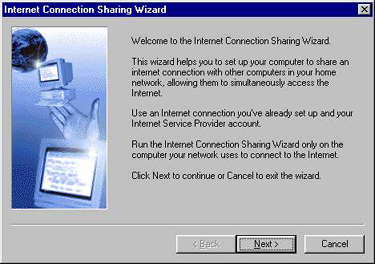
For Cable Modem/DSL Users...
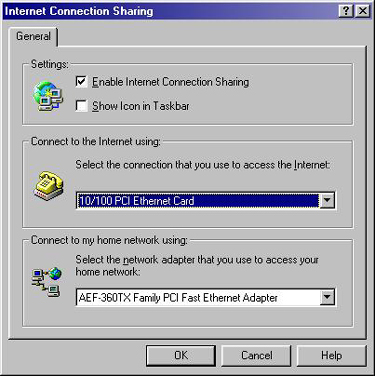
Under Settings put a check mark in Enable Internet Connection Sharing
Under Connect to the Internet using:, select the correct card used to access the Internet. If you heed my earlier warning, you shouldn't have any problem here.
Under Connect to my home network using:, select the correct card used in your LAN.
Click on OK to continue.
Configuring the other computers
All the other computers on your LAN are called Client computers.
Next take the disk to computer Z and repeat the above steps.
We're almost done.
Before we do the last step, go to computer X (the one that will connect directly to the internet) and do the following:
Gateway IP
Note: You have to be connected to your ISP in order to get the information below. If for some reason you cannot connect to your isp at this time, just ask your isp what the ip address is for their DNS servers.DNS IP
So now you have three pieces of information, Gateway IP, DNS IP, and Host Name. We will need these for the final step below.
Done!
http://www.microsoft.com/HOMENET/ics.htm
But what if you don't have windows 98 SE?
In that case you need a proxy server. A proxy server will serve the same purpose as win98 SE. We have already looked at wingate at the beginning of this tutorial, which costs $40. Wingate is worth the cost if you can afford it. It offers very easy installation and configuration. Others are winproxy, AllegroSurf. But for those who cannot afford to pay, here are some free proxy servers that you can try. Note that I haven't tested any of them, so I don't have any recommendations. If any of them works for you, please come back and share your experience with us.
http://www.pscs.co.uk/products/vsockslight/index.html. The lite version of this software if free, and guidelines are provided on how to set it up.
Proxy+ Free for 3 computers. Homepage: http://www.proxyplus.net/
AnalogX Proxy. A fast, simple to use, free way to share your Internet connection with several computers. AnalogX allows multiple machines on a local network to access the Internet through one machine - great for small businesses and individuals alike. Supports web browsing (HTTP/HTTPS), file transfer (FTP), mail (POP3/SMTP), news (NNTP), and now even Socks4/4a for things like AOL, AIM, MSM, etc! Homepage: http://www.analogx.com/
ProxyServerJ A simple HTTP proxy server written in Java. It allows users to share a single Internet connection (cable modem, dial-up etc). Homepage: http://members.home.net/vladimirl/
EasyProxy Server Perfect for a small office or home. Run this small server on your computer connected to the internet and setup all the other webbrowsers on your network to use proxy through it. Homepage: http://www.leechsoftware.com/easy_proxy/
Easy Proxy Proxy Server, multithreaded engine provides fast access to dozens of LAN users. Share your dialup connection with the rest of the network. Homepage: http://www.leechsoftware.com/easy_proxy/
If any of them works for you, do come back and share your experience with us.
Please report broken links. Thank you.
If you have questions, before emailing me to say your other computers cannot access the internet,
- make sure your ordinary network works fine. That means all the computers on your network can see each other, and you can transfer files back and forth between them
- go over this entire tutorial again carefully, and make sure you haven't missed a step